Membership and Event Management Software: Do You Need One System or Two?



Membership and Event Management Software: Do You Need One System or Two?
Membership and event management software keeps your members and your events in one connected system, so member records, payments, and event sign-ups all live together instead of in separate tools. For most membership organizations, one combined system saves time and cuts down on double entry. You might still want a second tool for large public ticketing, and this guide shows you how to tell which setup fits your group.
Key takeaways
- Membership and event management software brings your members and your member events into one place.
- One connected system suits most member-focused organizations, from associations to clubs.
- Two separate tools can make sense when you run big public, ticketed events.
- The features that matter most are member pricing, easy check-in, automatic renewals, and data that stays in sync.
What is membership and event management software?
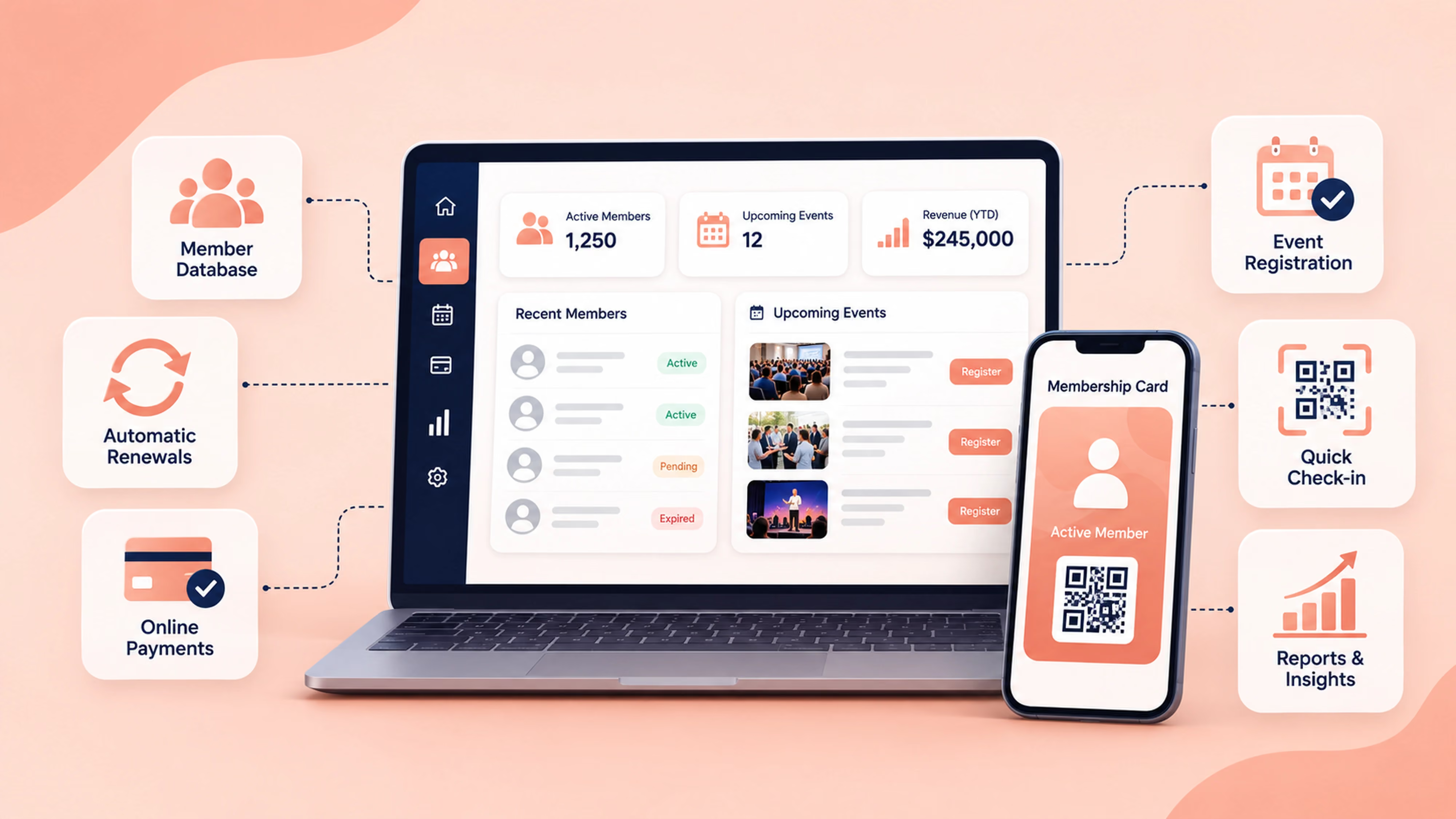
Membership and event management software is a single platform that manages your members and the events you run for them. It combines a membership database with event registration, so sign-ups, payments, and attendance all connect back to each member's record.
Instead of exporting a list from one tool and importing it into another, everything updates in one spot. A member joins, renews, registers for an event, and checks in, and each step shows up on their profile automatically. That connection is the whole point, and it is what separates a combined platform from a standalone events app.
Do you need one system or two?
Most member-focused organizations do well with one connected system, because their events are for members and tie directly to membership status. Two separate tools tend to fit organizations whose events are large, public, and ticketed to a wide audience beyond their members.
Here is a simple way to compare the two setups.
What you are managingTwo separate toolsOne connected systemMember recordsLive in the membership tool, then copied into the event toolMembers and their event history sit in one placeMember pricing for eventsApplied manually, easy to get wrongApplied automatically by membership typeRenewals and duesTracked in the membership tool onlySit alongside event activity on the same dashboardCheck-inA separate list or app to manageScan digital cards or QR codes tied to the member recordData entryOften done twiceDone once, updates everywhereBest fitLarge public, ticketed eventsRegular member events and mixed programs
If your events are mostly for members, one system is usually the simpler, calmer choice. If you sell thousands of public tickets, a dedicated ticketing tool alongside your membership platform can be worth it.
How does integrated event registration work?
Integrated event registration lets members sign up for your events straight from your membership platform, using the profile they already have. Because the platform already knows who is a member and what type of membership they hold, it can offer member pricing, free member access, or members-only events without any manual sorting.
You create an event, choose who can register, and share the link. Members register and pay online if there is a fee, and their registration lands on their member record right away. On the day, member check-ins are quick, since you can scan a member's digital membership card or QR code, or just search by name. Attendance then shows up on their profile, which helps you see who is engaged over time.

When does one combined system make sense?
One combined system is a strong fit when your events and your memberships are closely linked. It tends to work well if you recognize a few of these:
- You run regular events for members, like meetups, classes, talks, or socials.
- You want to offer member pricing or members-only events without manual work.
- You would like renewals, dues, and event activity in one view.
- Your team is small and you want less software to manage.
- You want each member's event history on their record for retention and reporting.
Associations, clubs, and cultural organizations often land here, because their events are part of the membership experience. Groups like professional associations and arts, theatres and museums use events to keep members involved year round.
When might two systems work better?
Two systems can be the better call when your events reach far beyond your members. That is common for organizations selling large volumes of public tickets, running multi-day conferences with complex ticket tiers, or needing specialized tools like assigned seating or a box office.
The good news is that you do not have to choose between a connected member experience and powerful ticketing. Many organizations keep their membership platform as the home base and connect a dedicated ticketing tool through integrations, so attendee data still flows back to the member record. If you want to weigh dedicated options, our guide to event registration software walks through the main tools and how they compare.
What should you look for in membership and event management software?
Focus on the features that save your team time and give members a smooth experience. These buying criteria hold up across most organization types:
- A connected member database. Event activity should link to each member's record, not sit in a separate export.
- Member pricing and access rules. The system should apply member rates or members-only access based on membership type.
- Online registration and payment. Members should be able to register and pay in one step, with recurring payments supported for dues.
- Automatic renewal reminders. Fewer lapsed members means a healthier organization and less chasing.
- Simple check-in. Look for QR code or digital card scanning so event day runs smoothly.
- A self-service member portal. Members should be able to manage their own details, payments, and registrations.
- Integrations. The platform should connect with the tools you already use, including a ticketing tool for larger public events.
- Clear, fair pricing and a free trial. You should be able to try the workflow before you commit.
How Join It brings members and events together
Join It is membership management software that connects your members and your member events in one place. Members can register for events through their member portal, pay online for paid events, and see everything on the profile they already use. Their event registration and attendance link straight back to their member records, so you always know who took part.
On event day, member check-ins are quick, since you can scan a member's digital membership card or QR code, or search by name. Dues and recurring payments sit on the same dashboard, and renewal reminders help keep members active. For larger public ticketing, Join It connects with tools like Eventbrite through integrations, so attendee data still syncs to your member database.
Join It is a good fit for associations, clubs, nonprofits, and cultural organizations that run events for their members and want one calm, connected system. Plans start under $29 a month, and every plan includes a free trial with no credit card required. If your events are mostly large public sales with complex ticketing, a dedicated ticketing platform connected to Join It may serve you better, and that is a perfectly good setup too.
Frequently asked questions
Does membership software include event registration?Some membership software includes event registration, and some does not. Join It includes event registration for members, so they can sign up and pay through the platform they already use, with their activity linked to their member record.
Can I charge members for events?Yes. With Join It, you can collect payment for paid events, and members can register and pay online in one step. Member pricing can be applied based on membership type.
Do I need separate event software?Most member-focused organizations do not need separate event software, since a connected system handles member events well. Separate ticketing software tends to help when you sell large volumes of public tickets or need advanced ticketing features.
Can members register and pay for events online?Yes. Members can register and pay online through their member portal, and the registration lands on their member record automatically.
Does membership and event management software handle check-in?Yes. Join It supports quick member check-ins by scanning a digital card or QR code, or by searching a member's name, with attendance saved to their profile.
Can it work with a ticketing tool for public events?Yes. Join It connects with ticketing tools like Eventbrite through integrations, so you can run larger public events while keeping attendee data synced to your member database.
The bottom line
If your events are mostly for members, one connected system is usually the simpler and more reliable choice, since member pricing, check-in, and renewals all work together without extra data entry. If you run large public ticketed events, pairing a dedicated ticketing tool with your membership platform can be the better fit, and a good membership system makes that easy to connect.
Want to see how members and events work together in one place? Take a look at how event registration and member check-ins work in Join It, and start a free trial when you are ready.
To explore how Join It connects membership administration with events, visit its membership and event management software overview.
.avif)
Guides from the Experts
Through our work with 4,000+ organizations - we’ve put together helpful guides to assist; regardless of where you are on your journey.
.webp)

A Complete Guide to Membership Organizations
Everything you need to know to manage and grow your membership business
.webp)
Maximize Membership Retention: 10 Proven Strategies
Tried and true strategies that not only win membership, but keep them

Build a Membership Website: A Step-by-Step Guide
Your one-stop resource for knowing all the features your modern membership website needs
Ready to start your free trial?
Our membership software is intuitive to use and even easier to test for yourself.