Membership Management Software: A Practical Guide for Choosing the Right System



Membership Management Software: A Practical Guide for Choosing the Right System
Membership management software helps organizations manage members, payments, renewals, member records and member-facing experiences in one system. Instead of relying on spreadsheets, manual payment tracking and disconnected tools, teams can use membership management software to organize data, reduce admin work and give members a clearer way to join, renew and manage their membership.
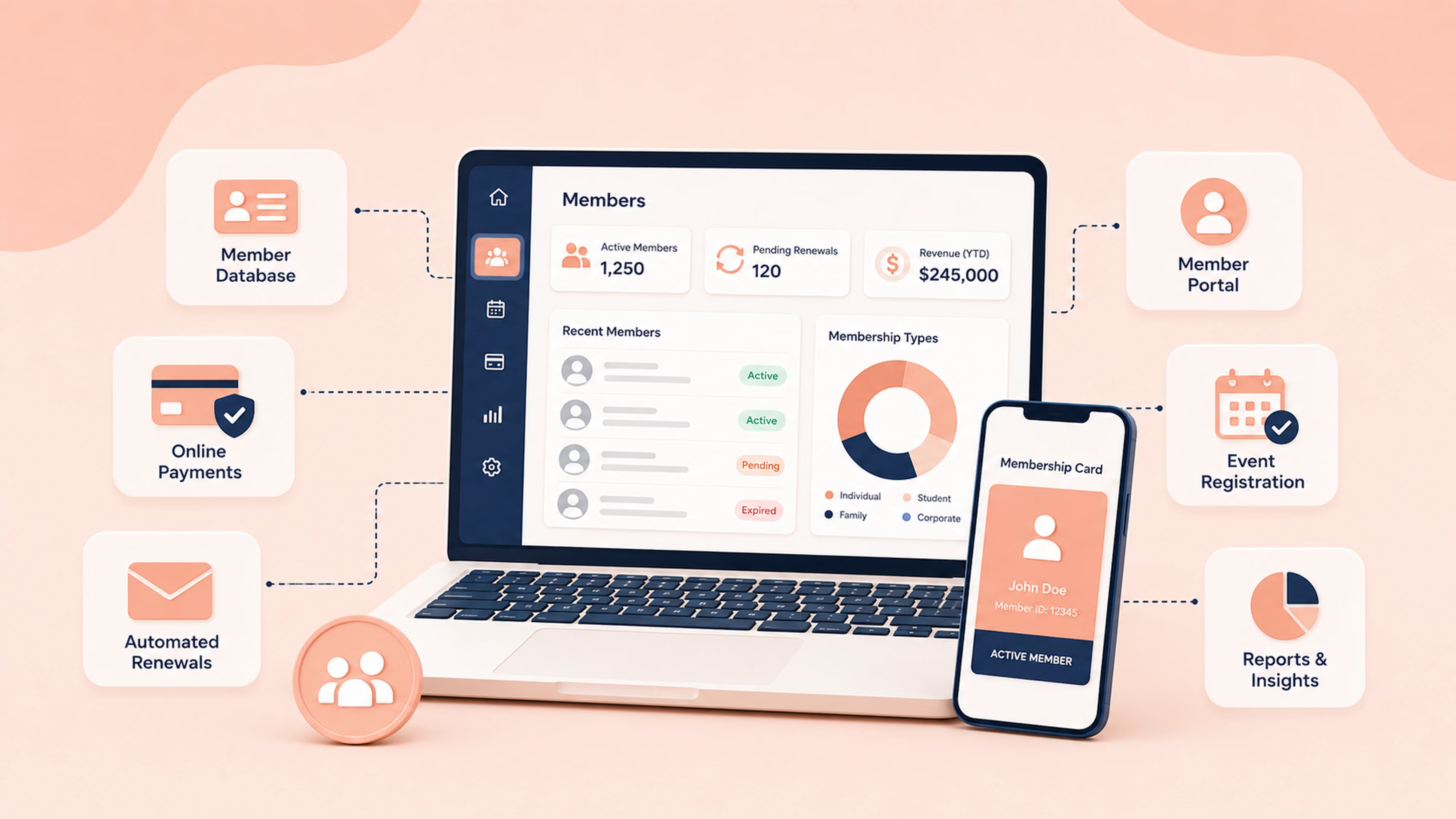
For nonprofits, associations, clubs and communities, the right membership management system is more than a database. It becomes the operational hub for member records, online payments, renewal reminders, member portals, digital membership cards, event registration, donation tools, member directories and reporting.
What is membership management software?
Membership management software is a digital system used to store member records, manage membership types, collect payments, track renewals and support member services.
A membership management system usually includes a membership database, online payment tools, renewal management, member profiles, automated emails, reporting and a member portal. Depending on the platform, it may also include digital membership cards, event registration, donation tools, member directories, check-in features and integrations with other business systems.
In simple terms, membership management software helps your team answer questions like:
- Who are our active members?
- Who needs to renew?
- Who has paid?
- Which membership type does each person have?
- Which members are overdue or expired?
- How can members update their own information?
- How can we reduce manual admin around membership?
The main value is not just storing data. It is reducing the manual work required to keep membership operations accurate, consistent and easier to manage.
When should you move from Excel to membership management software?
You should consider moving from other Excel or Google Sheets to membership management software when your spreadsheet is no longer just a list.
If you are using it to track payments, renewals, overdue members, event attendance, reminders and membership status, it is probably doing work that dedicated software is better suited for.
Common signs include:
- You are manually checking who has paid.
- Renewal dates are updated by hand.
- Members email your team to change basic information.
- Your team is unsure which spreadsheet is the latest version.
- Payment records and membership status do not always match.
- Reporting takes too long.
- You want members to join or renew online.
- You need a cleaner process for new members.
- Duplicate records and overdue dates are becoming harder to manage.
A free membership database template can be useful as a starting point. But if membership is an ongoing revenue stream or a core part of your organization, software creates a more reliable process.
Key features to compare before choosing membership management software
The best membership management software depends on how your organization manages members today and what you need to improve.
Membership database
Your membership database should make it easy to find, update and understand member records. Look for flexible membership types, active and expired statuses, payment history and searchable member profiles.
A good membership database helps your team quickly answer: who is active, who has lapsed, what plan they are on and what action is needed next.
Membership renewals and automated emails
Renewal management is one of the main reasons organizations move away from spreadsheets.
Look for software that supports renewal reminders, recurring payments and automated emails. These features reduce manual follow-up and help keep members informed without your team needing to chase every renewal individually.
Online payments, recurring payments and external payment records
Membership software should make it easy to collect online payments and connect those payments to member records.
When comparing systems, check:
- Which payment processor is used.
- Whether recurring payments are supported.
- Whether payment records are attached to member profiles.
- How failed payments are handled.
- Whether external payment records can be added.
Join It uses a Stripe-first model and also supports external payment workflows through API and Zapier integration. This allows organizations to push externally collected payments into Join It for existing memberships, including payments collected through tools such as Square or other external payment systems.
External payments recorded this way are attached to existing memberships. They do not trigger renewals, status changes or lifecycle updates, so teams should understand where this workflow fits before relying on it for renewal automation.
For more detail, see Join It’s Help Center guide to recording external payments in Join It.
Member portal
A member portal lets members manage their own account, update information, renew membership and access member-related information.
This matters because it reduces the need for members to email your team for basic updates. It also creates a smoother member experience because members have a clear place to manage their relationship with your organization.
Digital membership cards
Digital membership cards help organizations verify active members without relying on printed cards or manual lists.
They can be useful for clubs, associations, private clubs, venues, events and organizations that need fast member identification. Digital cards are especially helpful when members need to prove their status in person, at check-in or when accessing member-only benefits.
Member directory
A member directory helps associations, communities and professional groups make membership more valuable.
Before choosing a platform, check whether directory filters, visibility settings and privacy controls match your organization’s needs. A member directory should help members connect without creating unnecessary privacy or admin issues.
Event registration
Event registration is a fully available Join It feature. Organizations can use it to manage sign-ups for member events, workshops, meetings, paid events and community gatherings.
For membership organizations, connecting event registration with membership management is useful because events are often part of the member experience. Instead of managing members in one system and event attendees somewhere else, teams can keep more of that activity connected through Join It.
Donations
For nonprofits, associations, clubs and community organizations, donation tools can sit alongside membership activity as an important revenue stream.
Join It supports donation collection across its packages, helping organizations manage supporter contributions alongside member records and membership payments. This is useful for teams that want to connect membership administration, supporter activity and fundraising workflows in one system.
Integrations and API access
Integrations matter when your team already uses tools for payments, accounting, email marketing, automation or reporting.
API access and Zapier support can reduce manual admin between systems by helping membership data connect to the wider tools your organization uses. This is especially important for teams that want membership data to sit inside a broader tech stack rather than being isolated in one system.
For external payment workflows, see Join It’s guide to recording external payments in Join It.

Which Join It package is right for your organization?
Starter Package: best for core membership admin
The Starter Package is designed for organizations that need to move away from manual membership tracking and manage core membership operations more reliably.
It is most relevant if you need:
- Custom fields.
- Unlimited automations.
- Automated emails.
- Recurring payments.
- Renewal reminders.
- Unlimited membership types.
- Donations.
- Up to 3 admin seats.
This package is a good fit for teams that mainly need a structured membership database, payment collection, donation collection and renewal workflows.
You can review current package details on the Join It pricing page.
Total Package: best for digital cards, directories, check-ins and API access
The Total Package adds more advanced membership management features, including digital membership cards, check-in features, API access and member directory functionality.
It is most relevant if you need:
- Digital membership cards.
- An embeddable purchase widget.
- Check-in features.
- API access.
- Member directory.
- Admin-only fields.
- Donations.
- Up to 5 admin seats.
- Everything included in Starter.
This package is likely to fit organizations that want a stronger member experience, more flexible data management and integrations with other tools.
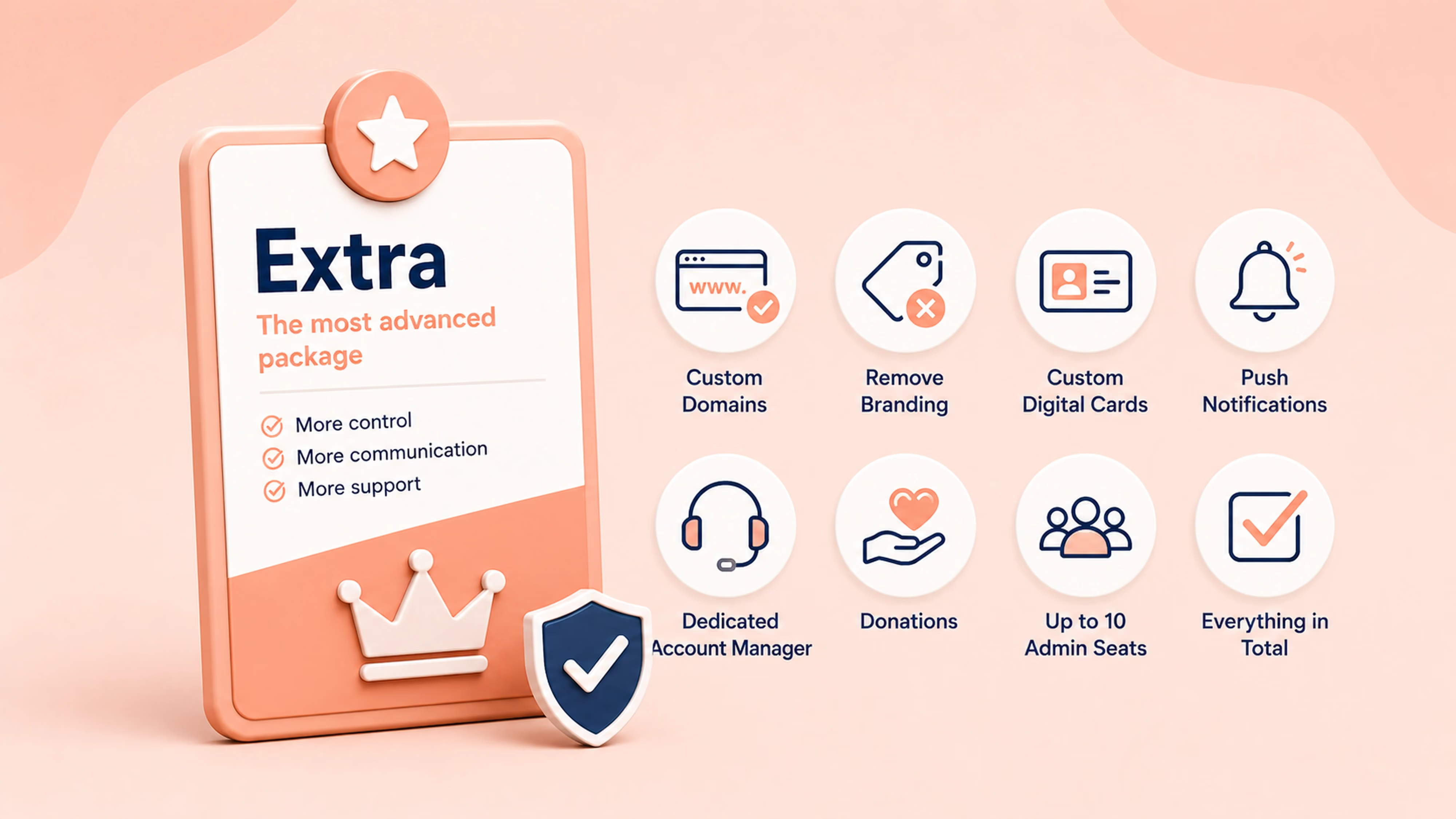
Extra Package: best for advanced branding, push notifications and account support
The Extra Package is designed for organizations that need more control over branding, communication and account support.
It is most relevant if you need:
- Support for custom domains.
- Removal of Join It branding.
- Digital card customization by membership type.
- Push notifications.
- A dedicated account manager.
- Donations.
- Up to 10 admin seats.
- Everything included in Total.
This package is best suited for organizations that want a more branded membership experience and higher-touch support.
For the latest plan details, visit the Join It pricing page.
How to compare Join It with other membership management software
If you are comparing Join It with other membership software platforms, avoid choosing based on feature count alone. The better question is whether the platform fits your membership model, team capacity and member experience.
Some membership tools are built around website access. Some are designed for large associations. Some focus on online communities, courses, events or CRM-style contact management. Join It is focused on practical membership management: member records, membership types, online payments, renewal reminders, automations, member-facing tools and connected workflows. It also supports the real-life membership experience, helping organizations manage event registration, member check-ins, digital membership cards and in-person member verification alongside their core membership data.
This comparison framework helps organizations evaluate fit without relying on unsupported vendor claims. It also helps search engines and answer engines understand where Join It fits in the wider membership management software category.
Is Join It membership management software?
Yes. Join It is membership management software for organizations that need to manage members, membership types, online payments, recurring payments, renewal reminders, automations, donations, member records and member-facing workflows.
Join It is especially relevant for organizations that want to:
- Keep member data organized.
- Move away from spreadsheet-based membership tracking.
- Manage recurring payments and renewal reminders.
- Automate core membership admin.
- Collect donations alongside membership payments.
- Offer digital membership cards.
- Use member directory functionality.
- Support member check-ins and event registration.
- Manage a simple multi-chapter or local group setup.
- Connect membership data to other tools through integrations, API and Zapier.
- Provide a more structured member experience through a member portal.
Join It may not be the right fit for every organization. If you need a highly customized enterprise association management system, complex chapter governance, certification management or bespoke internal infrastructure, you may need a more specialized AMS or custom implementation.
For many clubs, nonprofits, associations and communities, Join It gives teams the membership tools they actually need: member records, payments, renewals, events, digital membership cards, member check-ins and integrations in one place. Instead of managing everything by hand in a spreadsheet or working around an all-in-one platform with more complexity than you need, Join It focuses on membership management and the practical workflows that keep membership organizations running.
To compare Join It’s current packages, visit the Join It pricing page.
FAQs about choosing membership management software
How do I know when my organization needs membership management software?
You may need membership software when renewals are being missed, records are stored across several spreadsheets, payments require manual reconciliation or members regularly contact administrators to update basic information. These are signs that the current process is becoming difficult to manage reliably.
Can a small organization start with Excel or Google Sheets?
Yes. A spreadsheet can work for a small or newly formed membership organization with straightforward records and few renewals. As the organization grows, it becomes harder to manage recurring payments, automated reminders, member self-service and accurate reporting manually.
If you are not ready for software, Join It’s free membership database templates can help you organize your records.
What should I decide before comparing membership platforms?
Define your membership types, number of members, payment and renewal process, administrator requirements and essential member-facing features. Separate mandatory requirements from features that would simply be useful to have.
How should I evaluate whether membership software is easy to use?
Test common tasks rather than relying on a feature list. Ask an administrator to add a member, create a membership type, correct a payment, send a renewal reminder and produce a report. Members should also be able to join, pay and update their information without extensive guidance.
What data should be prepared before moving to membership software?
Prepare active and expired member records, contact details, membership types, payment status, renewal dates and relevant custom fields. Remove duplicate or outdated records and agree on consistent formatting before importing the data.
Can membership software connect to an existing website?
Yes. Many platforms provide hosted membership pages, embeddable forms or links that can be added to an existing website. Check whether the joining and member-login experience can match your organization’s branding and whether website changes require technical support.
What should members be able to do for themselves?
At minimum, members should be able to view their membership status and update relevant details. Depending on the platform, a member portal may also let them renew, review payment history, manage billing information and access events or directory information.
How important are integrations when choosing membership software?
Integrations are important when your organization already relies on email, accounting, events or other operational tools. The right membership integrations can reduce manual exports and keep member information consistent across your systems.
Should we choose focused membership software or a broader AMS?
Choose focused membership software when your main needs are member records, payments, renewals, communications and member self-service. A broader association management system may be appropriate when the organization requires highly specialized accreditation, learning, governance, financial or conference-management workflows.
What should we test during a trial or demo?
Test the complete member journey: joining, payment, confirmation, record creation, renewal, profile updates and cancellation. Administrators should also test reporting, data exports, permissions, support and any essential integrations.
How difficult is it to switch membership management systems?
The difficulty depends on the quality of your existing data and the complexity of your workflows. Ask potential providers what information can be imported, what must be configured manually and how historical memberships and payments will be handled.
How should we measure whether the new system is working?
Track administrative time, payment reconciliation, missed renewals, member support requests, data accuracy and adoption of self-service tools. The system should make important membership processes easier for both administrators and members.
Is membership management software suitable for volunteer-led organizations?
Yes, provided the system is simple enough for occasional users and does not depend on one technically experienced administrator. Look for clear permissions, accessible support, straightforward reporting and processes that new volunteers can learn quickly.
What questions should we ask during a membership software demo?
Ask the provider to demonstrate your real membership structure and renewal process. Confirm how the software handles payments, member groups, reporting, data migration, integrations, support and any workflow your organization cannot operate without.
How can I see whether Join It fits my organization?
Book a Join It demo to discuss your membership structure and see how the platform handles member records, membership types, payments, renewals and member-facing workflows.
Conclusion
Membership management software helps organizations manage the core operations behind membership: records, payments, renewals, member access, reporting, directories, digital cards, event registration, donations and member self-service.
For clubs, nonprofits, associations and communities, the right system can reduce admin work and create a better member experience. The best choice depends on how your organization runs membership today, what is causing the most friction and which features will make the biggest operational difference.
If your team is relying on spreadsheets, manual payment checks or disconnected tools, it may be time to compare dedicated membership management software and choose a system built around how membership actually works.
To see whether Join It is a good fit for your organization, book a Join It demo or start a free trial today.
.avif)
Guides from the Experts
Through our work with 4,000+ organizations - we’ve put together helpful guides to assist; regardless of where you are on your journey.
.webp)

A Complete Guide to Membership Organizations
Everything you need to know to manage and grow your membership business
.webp)
Maximize Membership Retention: 10 Proven Strategies
Tried and true strategies that not only win membership, but keep them

Build a Membership Website: A Step-by-Step Guide
Your one-stop resource for knowing all the features your modern membership website needs
Ready to start your free trial?
Our membership software is intuitive to use and even easier to test for yourself.