Gift Aid is now built into Join It for UK charities and CASCs
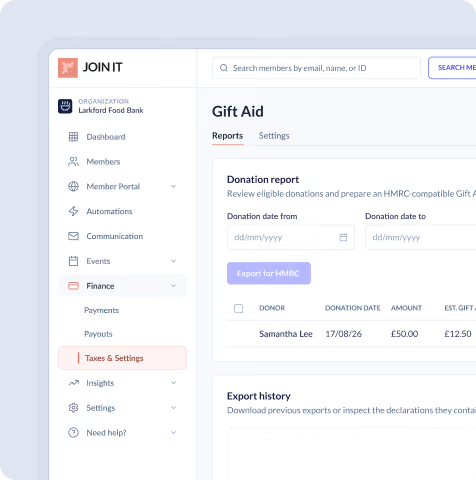


Gift Aid is now built into Join It for eligible UK charities and Community Amateur Sports Clubs (CASCs) that use GBP. Our online donation tools can now collect Gift Aid declarations during donation checkout, keep the required records and prepare an HMRC-compatible claim schedule—all alongside your membership and donation data.
That means less time piecing together declarations and spreadsheets, and more of each eligible donation going towards your community.
This feature is available to UK-based organisations that use GBP in Join It and are eligible to claim Gift Aid.
What is Gift Aid?
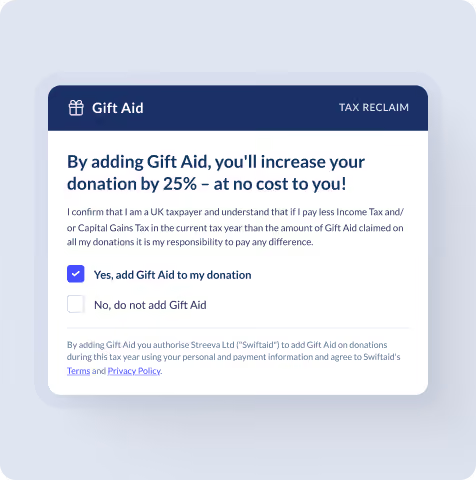
Gift Aid is a UK tax relief that lets eligible charities and CASCs claim an extra 25p from HMRC for every £1 donated by an eligible individual. It does not cost the donor anything extra.
For example, a £20 donation could be worth £25 to your organisation.
To qualify, the donor must make a Gift Aid declaration and have paid enough UK Income Tax or Capital Gains Tax to cover the Gift Aid claimed across their donations. Your organisation must also be recognised by HMRC as an eligible charity or CASC.
You can find the complete eligibility rules in the official GOV.UK Gift Aid guidance.
Why has Join It added Gift Aid?
We heard a clear message from UK charities and non-profits: managing donations in one system and Gift Aid somewhere else creates more admin.
Some organisations kept donations separate from their membership platform. Others collected declarations and matched them to payments by hand. Either way, volunteers and small teams were left maintaining another process—and usually another spreadsheet.
Gift Aid in Join It brings those jobs together.
If you already use Join It to manage your member records, automate recurring payments and collect donations, you can now collect the information needed for Gift Aid in the same place.
Alongside Gift Aid, explore Join It’s membership software for charities to see how you can organize your charity’s member records, payments and renewals.
How does Gift Aid work in Join It?
Once Gift Aid is enabled, the process is straightforward:
- A supporter makes a standalone donation through your public Join It donation form or embedded donation widget.
- The supporter chooses whether to add Gift Aid.
- If they opt in, they confirm the tax statement and provide their full name and home address.
- Join It records the declaration after the donation is successfully paid.
- The supporter receives an email containing a written record of their declaration.
- The payment receives a Gift Aid badge and appears in your Gift Aid report.
- When you are ready to claim, an organisation owner generates an HMRC-compatible
.odsschedule. - Your organisation reviews the file and uploads it through HMRC Charities Online.
Join It prepares the declaration records and schedule. Your organisation remains responsible for confirming eligibility and submitting the claim to HMRC.
What does Join It handle for you?
The distinction is simple: Join It helps you collect and report Gift Aid. It does not submit the schedule or make the Gift Aid claim on your behalf.
Which organisations can use Join It’s Gift Aid feature?
Your organisation can use Join It’s Gift Aid tools if it:
- Is based in the United Kingdom
- Uses GBP as its currency in Join It
- Is a charity or CASC eligible to claim Gift Aid
- Has a legal name and charity number or CASC reference
- Accepts standalone online donations
Your organisation is responsible for confirming that it is registered and eligible to claim Gift Aid with HMRC.
Which donors can select Gift Aid?
The donor must:
- Be an individual donating their own money
- Have paid, or expect to pay, enough UK Income Tax or Capital Gains Tax to cover the Gift Aid claimed across all their donations that tax year
- Provide their full name and home address
- Accept the Gift Aid declaration during checkout
A donor can live outside the UK if they have paid enough qualifying UK tax. They must provide their full overseas home address.
Donors in the Channel Islands or Isle of Man should leave the postcode field blank.
Which donations does the feature cover?
Join It currently collects Gift Aid declarations for new, standalone online donations from individuals.
The current feature does not collect Gift Aid for:
- Membership payments
- Event registrations
- Merchandise purchases
- Company payments
- Donations made before Gift Aid was enabled
- Donations where the declaration was not completed during checkout
HMRC has special rules for some payments, including certain charity membership fees. Join It’s current feature only covers standalone donations, so check the HMRC guidance on qualifying donations if you are unsure.
Each declaration collected by Join It applies only to the donation being made. A donor must opt in again when making another donation.
Join It cannot currently add or backdate a declaration after checkout. This limitation applies to Join It’s workflow; HMRC has separate rules about declarations covering earlier donations.
What information can you see in the Gift Aid report?
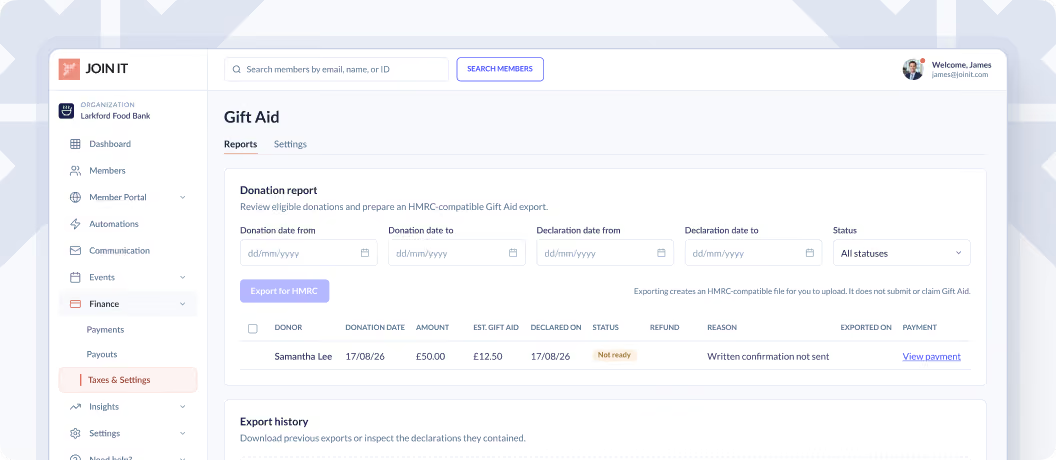
Your Gift Aid report gives you one place to review declarations and spot anything that needs attention.
You can filter the report by:
- Donation date
- Declaration date
- Status
Each declaration has one of four statuses:
- Claim ready: The donation is paid and complete, has not been refunded or cancelled, and the written record was sent successfully.
- Exported: The declaration was included in an earlier HMRC export.
- Not ready: The declaration cannot currently be exported. The report shows the reason.
- Cancelled: The donor’s cancellation has been recorded.
A donation may be marked as Not ready if the payment is incomplete, donor information is missing, a written confirmation has not been sent, or the donation has been fully or partially refunded.
Join It also keeps an export history, helping you see when each file was created, who created it and which payments it included.
How do you switch Gift Aid on?
An organisation owner can enable the feature in a few steps:
- Confirm that your organisation’s address is in the UK and its Join It currency is GBP.
- Open Finances in your Join It dashboard.
- Select UK Gift Aid.
- Open the Settings tab.
- Enter your charity or CASC legal name.
- Enter your charity number or CASC reference.
- Select Enable Gift Aid declarations on donations.
- Save your changes.
Gift Aid will then appear on your public donation checkout.
We recommend making a small test donation afterwards. This lets you review what supporters will see and confirm that your organisation’s legal name appears correctly.
Because Join It cannot add its current per-donation declaration after checkout, switching the feature on now means eligible supporters can opt in on future donations.
How much does Gift Aid cost in Join It?
There is no separate fee for enabling Gift Aid, collecting declarations or viewing your Gift Aid report.
Generating the HMRC export file requires the Extra Package.
The export follows HMRC’s OpenDocument Spreadsheet format and uses the .ods file extension.
HMRC allows a maximum of 1,000 donation lines on each schedule. If you have more than 1,000 donations to claim for, you can produce and submit more than one schedule. The official requirements are explained in HMRC’s schedule spreadsheet guidance.
Do not rename the worksheet or convert the exported file to another format before uploading it to HMRC.
Is Join It’s Gift Aid feature a good fit for your organisation?
It may be a good fit if you are an eligible UK charity or CASC that wants to:
- Collect donations through the same platform used to manage members
- Make it simple for supporters to add Gift Aid
- Keep declarations and payment records together
- Replace a manual Gift Aid spreadsheet process
- See which donations are ready to include in a claim
- Prepare an HMRC-compatible schedule without building it line by line
The current feature will not meet your needs if you require Gift Aid declarations for membership fees, events or merchandise, or if you need a provider to submit the final HMRC claim for you.
We’d rather make that clear now, so you can choose the right process for your organisation.
Frequently asked questions
Does Join It claim Gift Aid automatically?
No. Join It collects the declaration, keeps the record and prepares an HMRC-compatible schedule. Your organisation reviews the schedule and submits the claim through HMRC Charities Online.
How much can our organisation claim?
An eligible charity or CASC can normally claim an extra 25p for every eligible £1 donated. A £100 eligible donation could therefore be worth £125 to the organisation.
Does Gift Aid cost the donor more?
No. Gift Aid does not increase the amount the donor pays. The donor must have paid enough UK Income Tax or Capital Gains Tax to cover the Gift Aid claimed.
Can we use Join It Gift Aid for membership fees?
No. Join It’s current Gift Aid tools apply to standalone online donations only. They do not collect declarations for membership fees, event registrations, merchandise or company payments.
Can we add Gift Aid to an earlier donation?
Not through Join It’s current checkout flow. The declaration must be completed while the donation is being made and cannot currently be added retrospectively in Join It.
Does one declaration cover future donations?
No. Each declaration collected by Join It applies only to the donation being made. The donor must opt in again for each future donation.
Can a donor living outside the UK select Gift Aid?
Yes, provided they have paid enough qualifying UK tax. They must provide their full overseas home address.
What happens when a donation is refunded?
Join It marks fully and partially refunded donations as Not ready, preventing them from being included in an export.
HMRC may allow Gift Aid on the remaining amount in some partial-refund circumstances, but Join It does not calculate that adjustment automatically. These cases should be reviewed separately against HMRC guidance.
Which Join It plans include Gift Aid?
All plans can enable Gift Aid declarations and view the reports. Generating the HMRC export file requires the Extra Package.
Who can configure and export Gift Aid?
Organisation owners can update Gift Aid settings, record cancellations and generate or download HMRC exports. Other authorised users may be able to review reports and declarations depending on their dashboard access.
Ready to collect Gift Aid with Join It?
If you already use Join It, go to Finances → UK Gift Aid → Settings to check your details and switch the feature on.
For screenshots, reporting details and export instructions, read the full Join It Gift Aid setup guide.
New to Join It? Explore our membership software for charities and non-profits and see how member records, payments, donations and Gift Aid can work together.
This article explains how Gift Aid works within Join It. It is not tax advice. HMRC guidance is the authority on organisational, donor and donation eligibility.
.avif)
Guides from the Experts
Through our work with 4,000+ organizations - we’ve put together helpful guides to assist; regardless of where you are on your journey.
.webp)

A Complete Guide to Membership Organizations
Everything you need to know to manage and grow your membership business
.webp)
Maximize Membership Retention: 10 Proven Strategies
Tried and true strategies that not only win membership, but keep them

Build a Membership Website: A Step-by-Step Guide
Your one-stop resource for knowing all the features your modern membership website needs
Ready to start your free trial?
Our membership software is intuitive to use and even easier to test for yourself.