How to Choose Sports Management Software for Your Club or League



Summary of the Article
The right sports management software is the one that handles your club's seasonal jobs: registration day, dues and renewals, rosters and waivers, check-in, communication, and handover to next year's volunteers. Start by listing those jobs, sort your requirements into Essential, Important, and Optional, then test shortlisted platforms with real club data before you commit. A membership-first platform like Join It covers dues, registration, renewals, check-in, and digital cards well, while a full sports-operations suite makes more sense if you also need match scheduling, standings, and officials management.
- Map workflows first: pick software for the jobs you actually do each season.
- Sort requirements by tier: Essential, Important, Optional. Over-buying wastes money and confuses volunteers.
- Ask every vendor the same questions: data export, total cost with processing fees, support, and children's data security.
- Test before you commit: run a free trial with a real roster before the season depends on it.
Picture this. It's registration day. A parent emails because the waiver wouldn't upload, another asks if she can pay in two installments, and your treasurer is still reconciling last season's dues in a spreadsheet. By September, three people have the "real" member list, and none of them agree.
That chaos is what good sports management software is supposed to end. But choosing a platform by comparing feature checklists usually makes it worse. This guide takes a different approach: start from the jobs your club or league does every season, build a requirements list from those jobs, and then test shortlisted sport management software against real scenarios before your committee commits. The examples here are all sports-specific; if you run a social club, church, or professional association instead, the general guide to membership software for clubs follows the same process.
Start With the Jobs Your Club Does Each Season
Most volunteer-run clubs do the same six jobs, season after season. Write down how your club handles each one today, and who does it:

- Registration day. Families sign up, upload waivers, ask about payment plans, and register siblings at once.
- Dues and renewals. Collecting fees, chasing late payments, and reminding people before memberships lapse. If dues are your biggest headache, our guide on how to track membership dues covers setting, collecting, and raising them.
- Rosters and waivers. Knowing who is registered to which team, and who has signed what.
- Check-in. Confirming at practice, a match, or the clubhouse that someone is actually a current member.
- Communication. Getting the right message to the right group without a personal email thread.
- Season handover. Passing the whole operation to a new volunteer committee, usually once a year.
The sixth job is the one most buying guides skip, and it's where volunteer clubs get hurt. Any athletics management software that only one person understands is a liability, because that person leaves every year or two.
Sort Requirements Into Essential, Important, and Optional
Now turn those jobs into a requirements list. Sort every requirement into three tiers:
- Essential: the software fails your club without it. For most clubs this means a member database, dues collection and automatic renewals, registration forms with waiver capture, and the ability to export all your data.
- Important: the club would feel the loss but could work around it. Think digital membership cards with QR check-in, family or group memberships, payment plans, and event registration with member pricing.
- Optional: nice in a demo, unused in practice. Scheduling engines, live standings, officials booking, and merchandise fall here for many clubs.
The point of the tiers is to stop you from paying for complexity nobody will use. A platform can be excellent sports manager software and still be a bad fit if its strengths are all in your Optional column.
Core Features to Evaluate
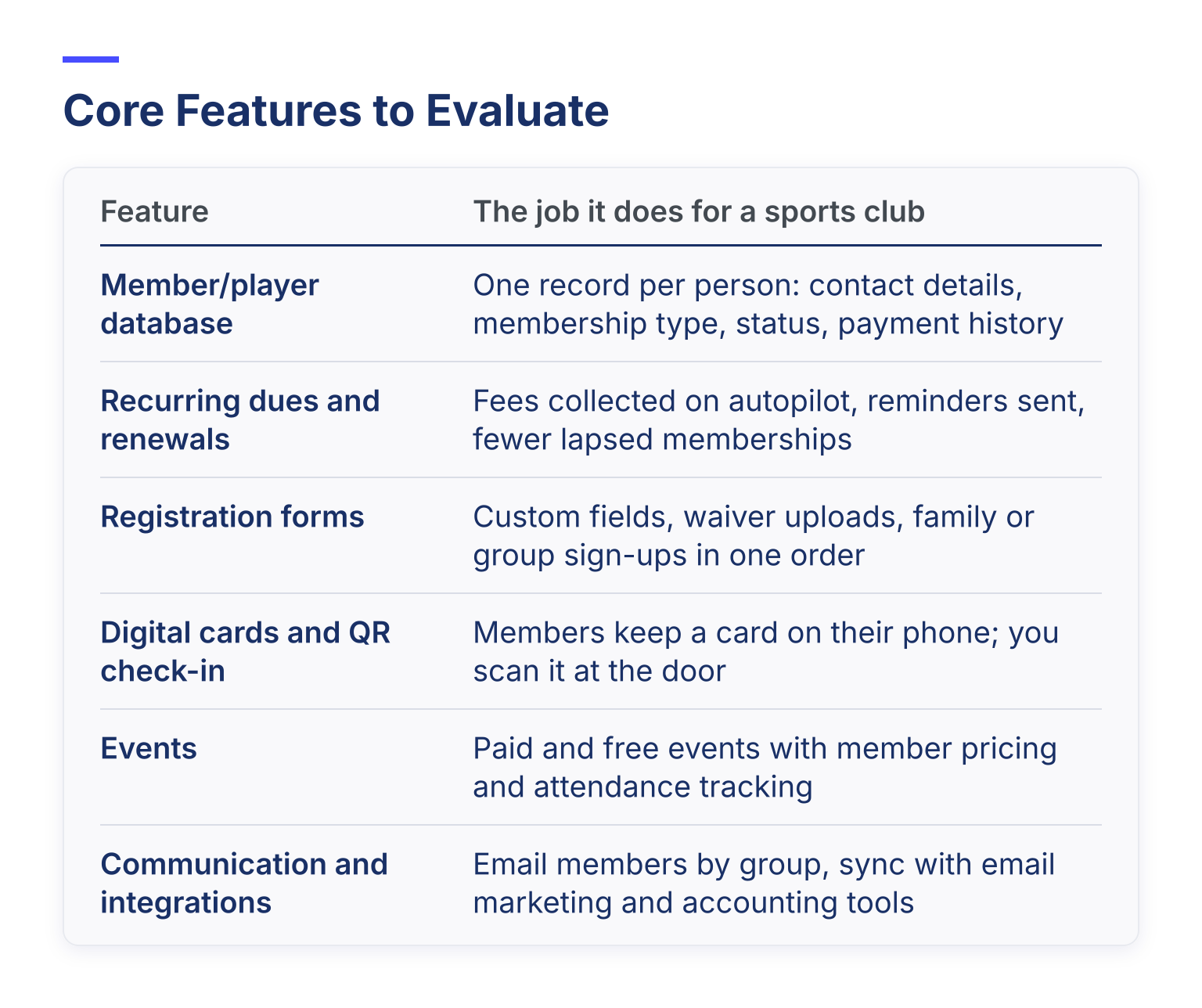
With your tiers set, compare platforms feature by feature against the job each feature should do:
| Feature | The job it does for a sports club |
|---|---|
| Member/player database | One record per person: contact details, membership type, status, payment history |
| Recurring dues and renewals | Fees collected on autopilot, reminders sent, fewer lapsed memberships |
| Registration forms | Custom fields, waiver uploads, family or group sign-ups in one order |
| Digital cards and QR check-in | Members keep a card on their phone; you scan it at the door |
| Events | Paid and free events with member pricing and attendance tracking |
| Communication and integrations | Email members by group, sync with email marketing and accounting tools |
Here's how that looks in practice. Join It is membership-first software: its core is a searchable member database that holds records, payments, notes, and activity together. On top of that it collects one-time and recurring dues, automates renewals, captures custom fields and waivers at signup through its form builder, runs free and paid events with member pricing controls and attendance tracking, and issues digital membership cards that work with Apple Wallet and Google Wallet. Members can update their own details and renew themselves in a self-service portal, and email tools plus integrations cover communication.
This is also where demos of athletic management software can mislead. Every feature looks essential in a demo, because the vendor is showing you their best. Your Essential and Important columns, not their screen, decide what matters.
What Join It does not try to do is run your league's match schedule, standings tables, or officials' assignments. Whether that gap matters depends entirely on your Essential column. If it does, the next section is for you.
Volunteer Usability Is a Selection Criterion, Not a Bonus
For a professional administrator, a steep platform is an inconvenience. For a volunteer treasurer with a day job, it's the reason your membership data stays in a spreadsheet.
So test usability directly. During any trial, hand the platform to the person who would actually run it, not the person evaluating it. Can they build a registration form, export a member list, and resend a renewal reminder without asking for help? When your season ends, can a new volunteer pick it up from a short handover note? If the honest answer is no, no amount of features saves you.
Questions to Ask Every Vendor
Ask the same questions of every platform and write the answers down, because they're what your committee will compare:

- Who owns the member data, and can we export everything?
- What does the platform cost at our member count, including payment processing?
- Can a non-technical volunteer run day one without training?
- How do we get help during the season, and how fast do you answer?
- How is our data protected, especially children's information?
- What happens to our data if we leave?
Two of these deserve extra attention.
Total cost. A cheap monthly plan with a high payment processing rate can cost more over three years than a pricier plan with lower fees. Model the full annual cost, including transaction fees, at your current member count and at the size you expect next season. You can see how one plan-plus-processing structure looks on Join It's pricing page, then run the same numbers for every platform you shortlist. One useful trick before you sign: estimate your registrations and fees for a typical "mock season" and model the totals at each member count.
Children's data. Youth clubs hold sensitive information about minors. In the United States, the FTC's COPPA compliance guide explains that online services collecting personal information from children under 13 must get verifiable parental consent and protect that data. Ask any vendor how their permission levels, access controls, and retention policies handle this, and keep the amount of child data you collect to what you truly need.
Test the Platform With Your Own Data
Demos show you a vendor's sample data. Trials should show you yours.
Before the trial ends, run one realistic scenario end to end. A good one is registration day for a family of three: sign up all three in one order, upload a waiver for each child, set up a two-installment payment, and confirm all three appear on your roster with correct statuses. Then try check-in, send a renewal reminder, and export every member record to a spreadsheet.
If the vendor offers help with migrating your existing member list, test that too, because moving last season's data is where switching platforms usually stalls.
A Simple Decision Process for Committees
Volunteer committees make better software decisions with a fixed process:
- Score against the jobs. Rate each shortlisted platform against your Essential and Important requirements, not its full feature list.
- Check the exit path. Confirm you can export all member and payment data and leave without penalty.
- Trial with a real roster. Run the registration-day test above with real data and the volunteer who'll own it.
- Decide before the season depends on it. Pick, migrate, and train while nothing is on the line.
Where Join It Fits, and When You Need More
Join It fits clubs and leagues whose core problem is membership admin: dues that lapse, renewals nobody chases, waivers on paper, and check-in at the door. Cricket clubs, cycling clubs, gyms, and similar member-based sports organizations use it exactly this way. For a real example, see how one club runs membership on Join It in this cricket club membership software guide, and browse Join It's sports club management software page for the full feature set.
Choose a full sports-operations suite instead if your Essential column includes automated match scheduling, live standings, or officials booking. Those are different jobs, and platforms built for them do them better than any membership-first tool will. Many clubs actually run both: a membership platform for people, dues, and check-in, and a scheduling tool for fixtures.
If your requirements list looks like the membership-first case, the fastest way to decide is to try it. Join It offers a free trial with no credit card required and no setup costs, so you can run the registration-day test with your own roster before spending anything. Start your free trial on the Join It homepage and see how it fits your club before the next season depends on it.

Guides from the Experts
Through our work with 4,000+ organizations - we’ve put together helpful guides to assist; regardless of where you are on your journey.


A Complete Guide to Membership Organizations
Everything you need to know to manage and grow your membership business

Maximize Membership Retention: 10 Proven Strategies
Tried and true strategies that not only win membership, but keep them

Build a Membership Website: A Step-by-Step Guide
Your one-stop resource for knowing all the features your modern membership website needs
Ready to start your free trial?
Our membership software is intuitive to use and even easier to test for yourself.