Digital Membership Cards: How to Make Them Work for Your Members



A member arrives at your event, opens their phone and shows their membership card. Your team scans it, checks their membership status and welcomes them in.
That’s the practical appeal of digital membership cards. They give members an easy way to carry proof of membership and help staff check eligibility without searching through spreadsheets or relying on a printed card.
For associations, nonprofits, clubs, gyms and museums, a successful rollout starts with a few simple decisions: what the card should show, how members will access it and how your team will check it.
Here’s how to get those details right.
What are digital membership cards?
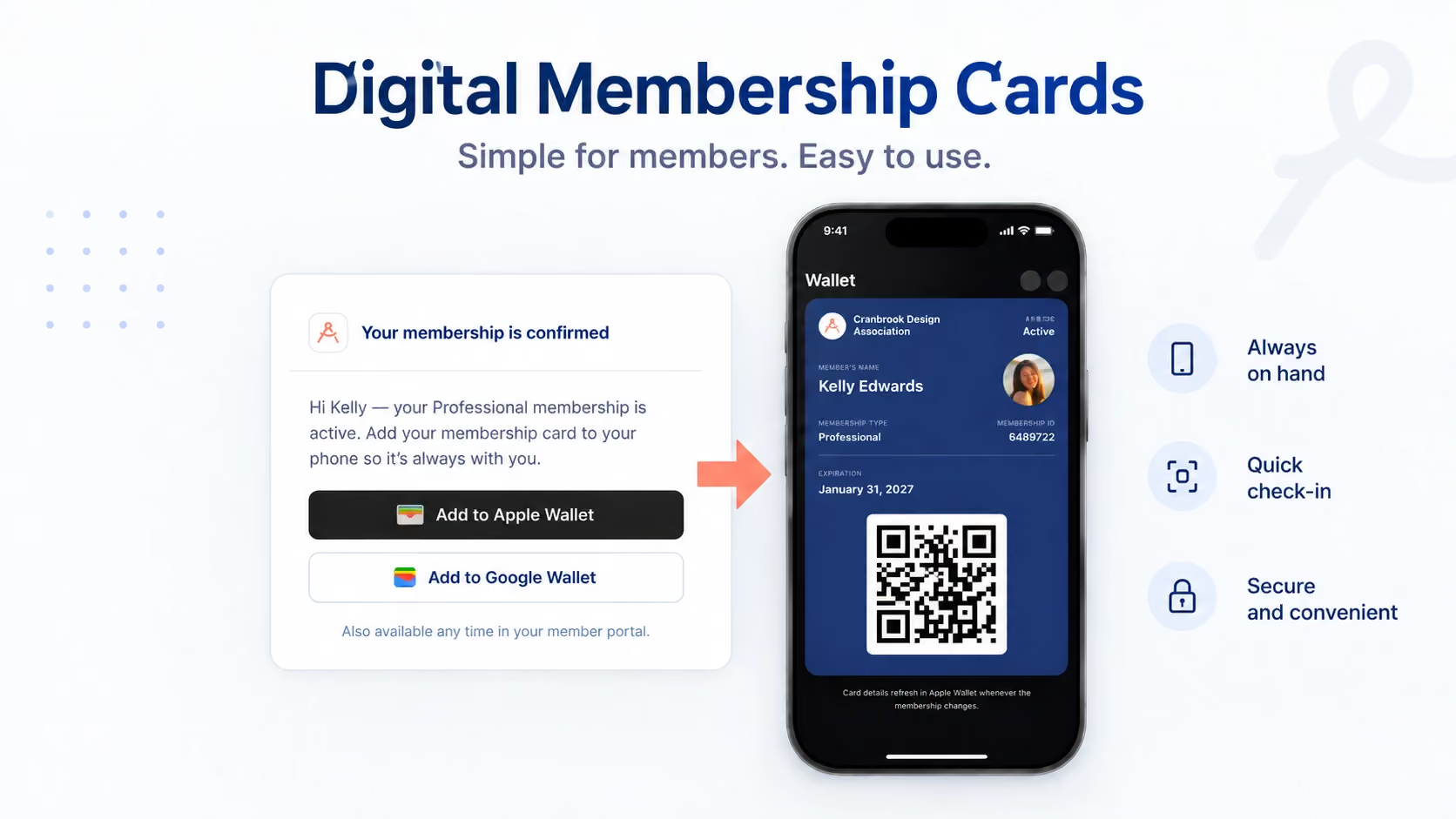
Digital membership cards are electronic cards that members access on their phones. Depending on the platform, members can save them to Apple Wallet or Google Wallet, open them from an email, or view them online.
A card typically displays identifying information, such as the member’s name, membership type and membership number. It may also include an expiration date and a QR code that staff can scan.
The card gives members something convenient to present. The membership record behind it helps your team confirm whether their membership is active.
That distinction matters. Looking at a card and checking a live membership record are different actions. Your staff should understand which method to use when confirming admission, discounts or other benefits.
Why switch from physical cards?
Physical cards can work well, but issuing and replacing them takes time. A member joins, someone prepares the card, and it gets printed, posted or collected. If the card goes missing, the process starts again.
Digital cards can simplify that routine.
Members can access their card on a device they already carry. Your team can spend less time arranging replacements, and you can reduce the printing and postage involved in issuing physical cards.
They can also make check-in easier. A scannable card gives staff a direct way to find the relevant membership record, rather than asking someone to spell their name in a busy entrance queue.
If you’re weighing up the change, our guide to the benefits of digital membership cards explores the wider considerations.
The goal is practical: make membership easier to use while reducing the work involved in managing it.
What should your digital membership card show?
Start with the information your team actually needs when someone presents their card.
Depending on your membership setup and the card format, useful details may include:
Keep the design easy to read on a small screen. Long benefit descriptions and unnecessary personal information can make a card harder to use.
Card layouts can also vary by platform. Apple Wallet and Google Wallet control aspects of how passes appear, so the same card may look different on different devices. Join It’s guide explains why digital membership cards look different across platforms.
Test the actual card on members’ phones before judging the design from a desktop preview.
How members access their cards with Join It
Join It offers digital membership cards compatible with Apple Wallet and Google Wallet.
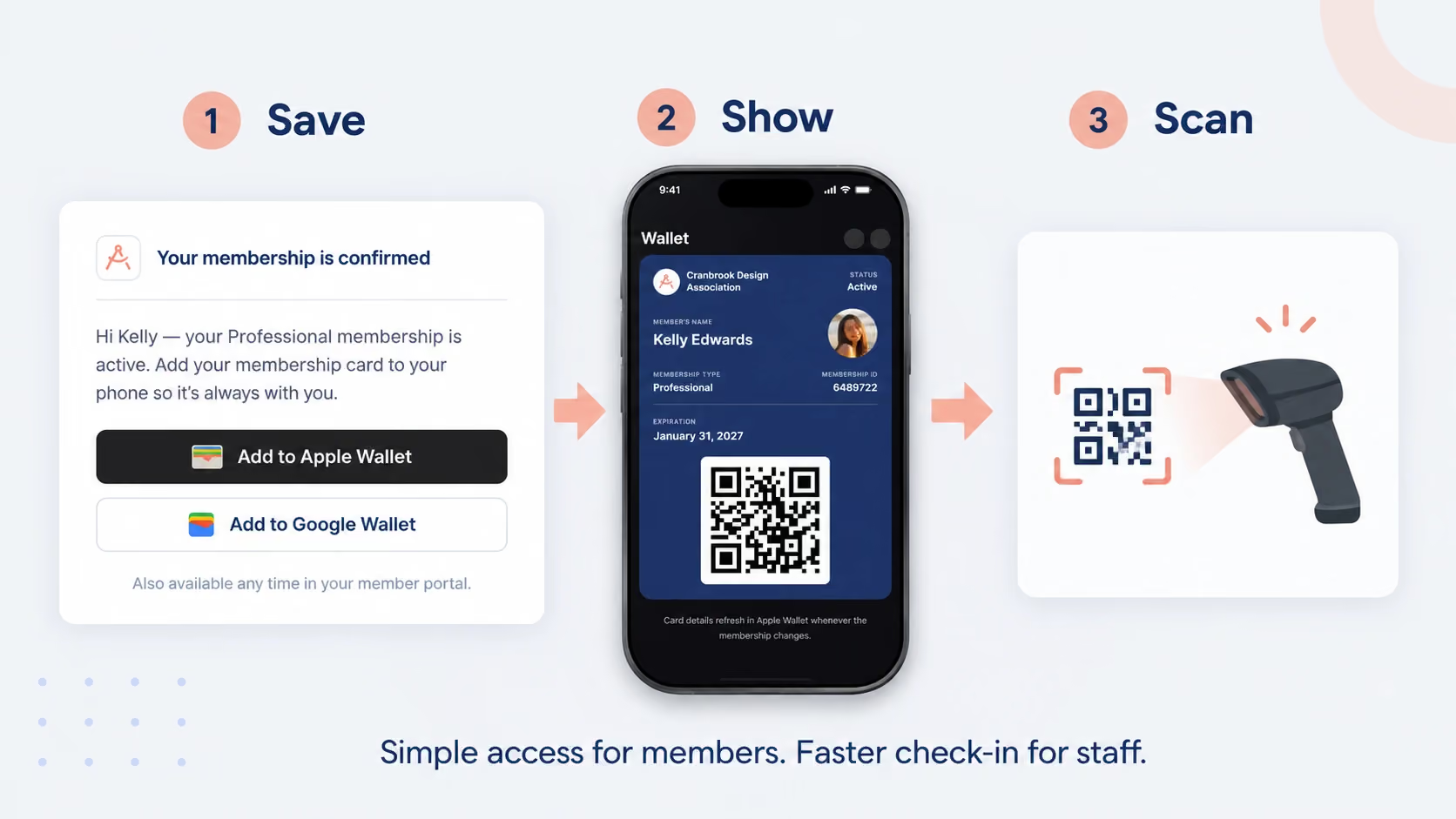
Once your organisation has set up the feature, members can access their card through their membership confirmation email. They can then follow the relevant wallet instructions to save it to their phone.
Make this process clear in your welcome communications. A short explanation is enough:
“Your digital membership card is included in your confirmation email. Save it to your phone’s wallet so it’s easy to find when you visit.”
Link members to the instructions for accessing and saving their digital membership cards, rather than expecting them to work it out at the door.
It also helps to explain when they’ll need the card. For example, should they show it at every visit, at member-only events, or when claiming a partner benefit?
Clear instructions make the card useful from the first day of membership.
How your team checks a membership card
Before introducing digital cards, agree on a consistent check-in process.
With Join It, organisation admins can check members in from their membership records or by scanning the QR code on their digital membership cards. You can read more about Join It’s member check-in feature.
Your team should know:
- How to scan a card and locate the membership record.
- How to check whether the membership is active.
- Which benefits or access apply to that membership type.
- What to do if the member cannot find their card.
- How to handle an expired membership or a failed scan.
A QR code helps staff find and check a record. It should not be treated as proof that the person presenting it is necessarily the named member. Where benefits are personal or non-transferable, decide what additional checks your organisation needs.
Keep the process proportionate and straightforward for both members and staff.
A real example: member check-in at Meepleville
Meepleville, a board game cafe, uses Join It to support its membership and check-in experience.
Members can join online, use a digital membership card and scan themselves in when they arrive. That helps a small floor team keep its attention on food, drinks and hospitality.
The useful lesson is that the card fits into a clear routine: join, receive the card and use it when visiting.
Read the Meepleville member check-in case study for an example of digital cards supporting everyday membership operations.
How to roll out digital membership cards
You don’t need a complicated launch plan. You do need to test the experience from both sides of the check-in desk.
Common mistakes to avoid
Assuming the card explains itself
Receiving a card doesn’t tell a member when to use it or how to save it. Include a brief explanation in the email and make the help link easy to find.
Treating appearance as a complete status check
A card image or screenshot may not show the latest membership information. Train staff to use the appropriate verification process when current status matters.
Making the design too crowded
The card should be readable at a glance. Keep detailed benefit descriptions and longer instructions on a linked page or in your member communications.
Overlooking renewals and membership changes
Test what happens when a membership renews, expires or changes type. Confirm how your chosen card format reflects those changes and what staff should check.
Forgetting members who do not use smartphones
Offer a workable alternative so those members can still access their benefits. Make sure staff know how to help without holding up the queue.
Frequently asked questions about digital membership cards
Do members need to download a separate app?
Join It’s digital membership cards work with Apple Wallet and Google Wallet, so members don’t need a separate Join It app to use their wallet card. Follow these instructions for saving a digital membership card.
Can members use a card without a smartphone?
Provide an alternative for members who don’t use smartphones. Depending on your organisation’s process, this could mean a printed card or staff looking up their membership record. Explain the options in your welcome instructions.
What happens when a membership expires?
Staff should check the current membership record before granting benefits that require an active membership. Don’t rely solely on a saved image or screenshot of a card. Test how your card format handles expiration and renewal so your team knows what to expect.
Can digital membership cards be used for check-in?
Yes. With Join It, admins can check members in from their membership records or by scanning the QR code on their digital membership cards. See how this works in the Meepleville member check-in case study.
Can we customise our digital membership cards?
Join It offers card customisation options, with additional template customisations available on certain packages. Apple Wallet and Google Wallet also impose layout requirements. Review the custom digital membership card guidance before planning your design.
What if a member cannot find their card?
Ask them to check their membership confirmation email and follow the link to access their card. Share the step-by-step card instructions. If they still need help, use your agreed member-lookup process so they aren’t left waiting at check-in.
Get started with digital membership cards
Digital membership cards work best when they fit naturally into how your organisation welcomes and serves members.
Keep the card clear, make it easy to access and give staff a reliable way to check membership status. Those details will do more for the experience than a complicated launch.
To explore the next step, see how members use digital membership cards with Join It, or explore Join It’s membership management software.
.avif)
Guides from the Experts
Through our work with 4,000+ organizations - we’ve put together helpful guides to assist; regardless of where you are on your journey.
.webp)

A Complete Guide to Membership Organizations
Everything you need to know to manage and grow your membership business
.webp)
Maximize Membership Retention: 10 Proven Strategies
Tried and true strategies that not only win membership, but keep them

Build a Membership Website: A Step-by-Step Guide
Your one-stop resource for knowing all the features your modern membership website needs
Ready to start your free trial?
Our membership software is intuitive to use and even easier to test for yourself.